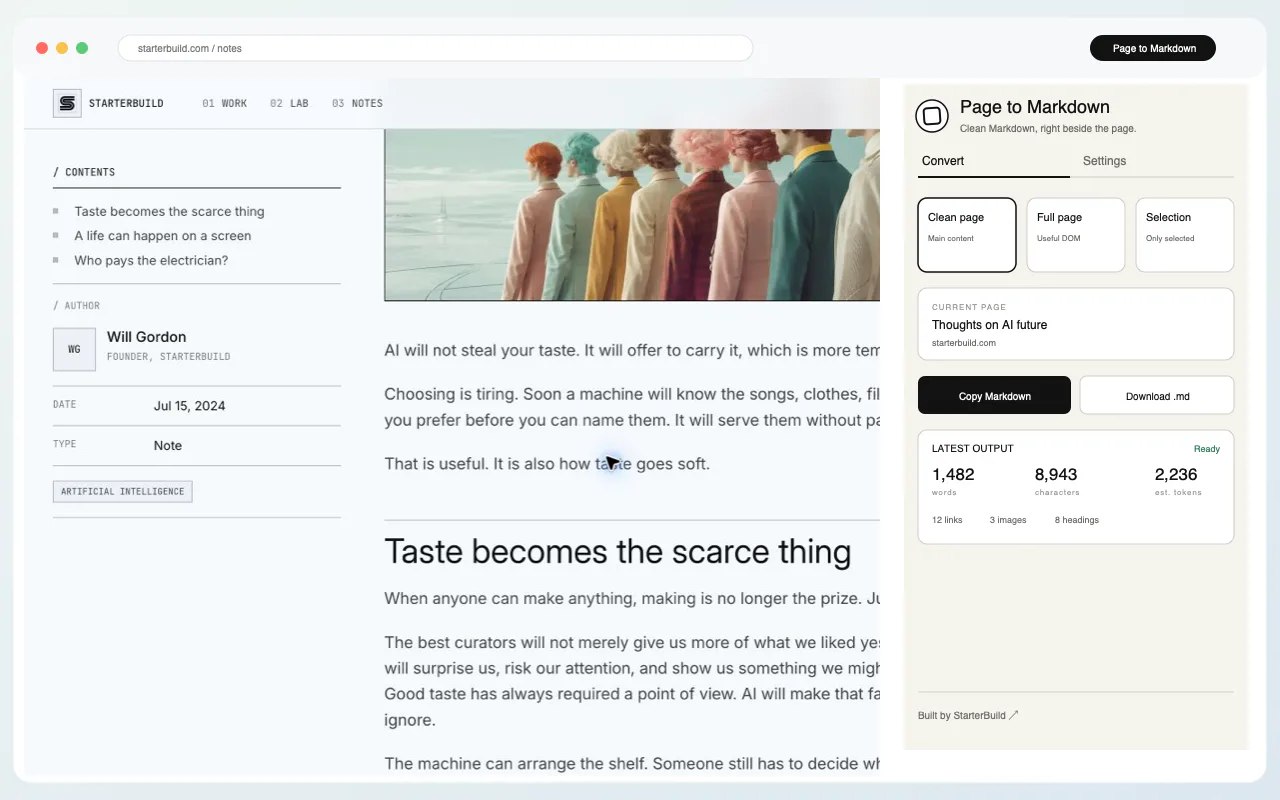
Take the part of the page you need
Clean page mode removes navigation and other clutter. Full page mode keeps useful rendered content in reading order. Selection mode converts only what you highlighted.
- Keep readable structure. Headings, links, images, lists, and blockquotes remain useful.
- Keep technical content. Tables, fenced code blocks, and expandable details are preserved when available.
- Choose the output. Copy the Markdown or download a ready-to-use .md file.
Clean Markdown, ready to use
The extension keeps the structure that matters instead of flattening the page into a block of copied text.
# Taste becomes the scarce thing

Choosing is tiring. Soon a machine will know
the songs, clothes, and food you prefer.

- headings
- links
- lists
- code blocks
Conversion stays in Chrome
There is no account, analytics, advertising, AI API, cloud sync, or StarterBuild server. Converted content exists in memory only long enough to copy or download. StarterBuild does not save the page or your browsing history.
Questions
Can I convert only selected content?
Yes. Highlight what you need and use Selection mode, or choose Copy selection as Markdown from the right-click menu.
Is page content sent to AI or a server?
No. Conversion runs locally in Chrome and does not send page content to StarterBuild or a third party.